
Technology
-
The Technology department at Leland Public Schools is dedicated to supporting staff, students and their families in pursuit of educational excellence. Our vision is to leverage the power of technology to improve student learning by providing engaging and powerful learning experiences and content. We also aim to provide seamless access to high-quality instructional resources and assessments that support and measure student achievement in more complete, authentic, and meaningful ways.
Students have access to personal technology at LPS in the following ways:
Kindergarten students have access to shared iPads in the classroom.
Students in 1st – 5th grade are each issued an LPS iPad in a rugged case with keyboard and touch pad, and with a cable and charger block. In Elementary School, these devices stay at school most or all of the time and are charged nightly at school.
Students in 6th – 10th grade are issued Macbook Neo laptop computers for 26-27.
Students in 11th – 12th grade are issued Macbook Air laptop computers for 26-27.
Content filtering
Leland Public School provides CIPA compliant content filtered Internet access to our onsite school network.
Additionally all devices issued to students are installed with CIPA compliant filtering onboard to provide content filtering while outside of school networks.Bring Your Own Device (BYOD) Policy:
We do not allow students personal phones, tablets, or other devices on the school network.
Students are only allowed to use school-provided devices on campus.Acceptable Use Forms required
Every student and a parent or guardian must sign a Technology Acceptable Use form to start the school year and be issued LPS technology. -
Acceptable Use Policy
We have an updated Technology Acceptable Use Policy that you should read and go over with your student. Parents and students must both sign this document and return it to the school before they can be issued any device, or use school accounts and services.
Acceptable Use Agreement Forms to be signed and submitted annually:
Acceptable Use Form for students entering grades 6-12 (PDF)
Acceptable Use Form for students entering grades K-5 (PDF)Parents and students should also read and follow our recommended Care Guidelines when using school issued iPads.
Parents and students should be aware of the Fee Schedule that describes the fees for damages, repairs, or replacements.
-
How to setup a new Parent Account for PowerSchool at Leland:
Open a web browser on your device and go here:
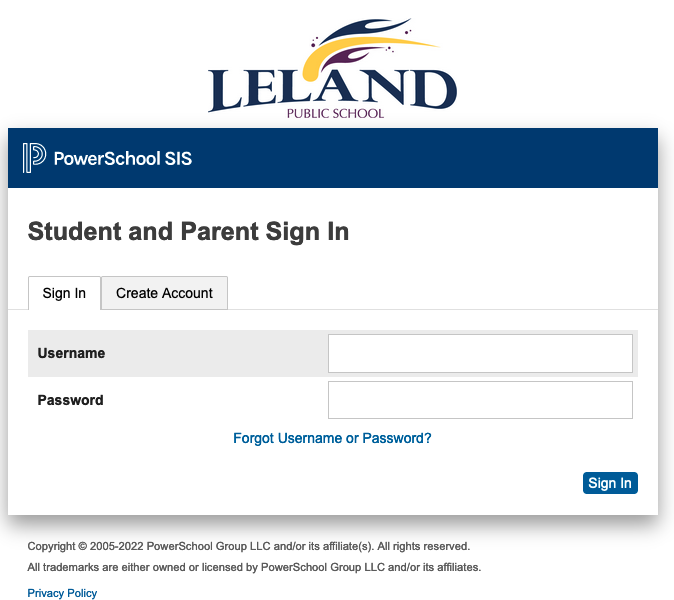
Open the “Create Account” tab, then select the “Create Account” button:
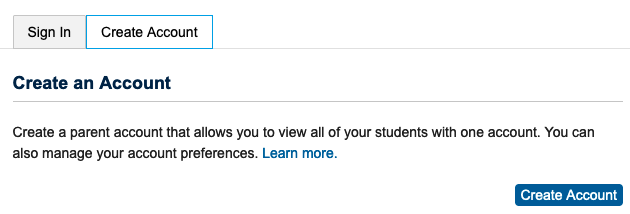
IMPORTANT:
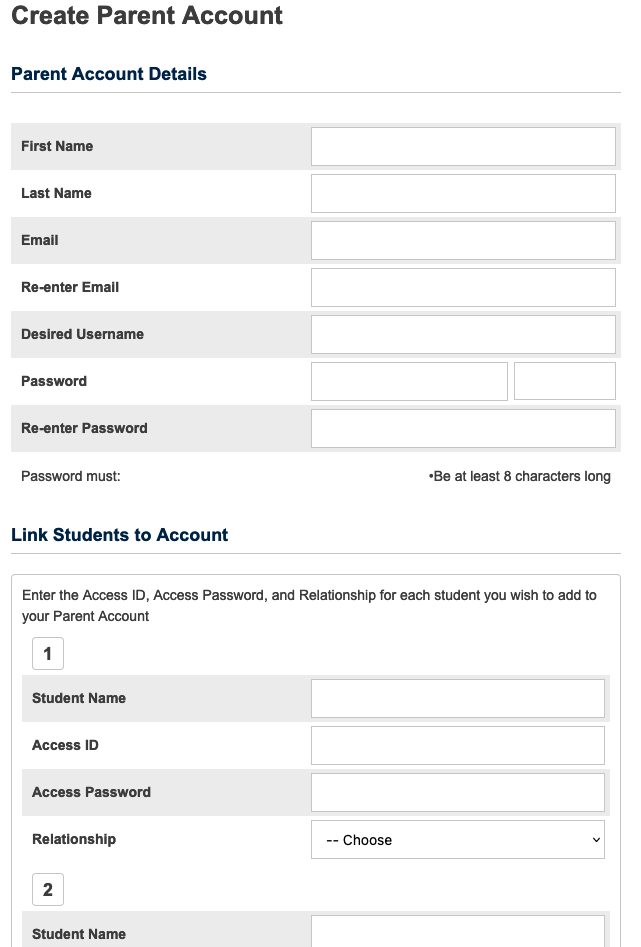
you will need the “Access ID” and “Access Password” provided by the school to link each student to your parent account
Next, enter your information to create your new account:
When finished select the “Enter” button at the bottom of the screen to finish:
-
iPad Care Guidelines and Damage/Loss Fee Schedule
iPad Care Guidelines
- Keep your iPad in a safe place when not in use: desk, shelf, locked house/room, etc.
- Do not leave your iPad in public spaces unattended: hallways, open classrooms, library, cafeteria, etc.
- Have your iPad charged and ready for school every day. We recommend charging it overnight at home.
- Avoid storing or using the iPad in precarious positions or places such as:
- hanging off the edge of a table or desk
- while standing or walking
- setting on a chair or the floor where someone might sit or step
- inside a bag or backpack that has heavier/harder objects inside that might crush it
- inside a hot or cold car or on a dashboard
- outdoors in weather such as rain or snow or intense sun
- while eating or around areas where food is being eaten
- Never throw, hit, or crush the iPad or try to pull on the keyboard
- Keep the iPad inside the case with the keyboard/cover closed when not in use
- Do not allow other students or siblings to use your iPad or accounts
- Never try to remove the iPad from its protective case
- Do not mark on or cut the protective case
- Do not try to remove or alter labels applied by the school
- Do not attempt to repair the iPad yourself
- Do not use liquids or solvents to clean the iPad, only use microfiber cloths
- Report all damages or problems to the Technology Department immediately
iPad Damage or Loss Fee Schedule
Leland Public Schools provides AppleCare coverage for school issued iPads. With this coverage, students may use one accidental damage claim per school year. Parents/guardians are fully responsible for any damages not covered by AppleCare and must pay for all repair or replacement costs. Students who exceed more than one valid accidental damage claim in a school year will be responsible for the entire cost to repair or replace the iPad or accessories.
In addition to the iPad, students are also issued a rugged keyboard case, a charge adapter, and charging cable. If these additional items are damaged, lost, or not returned at the end of the school year or upon student departure, then the following fee schedule below applies. Keyboard cases are not covered by AppleCare.
iPads and related equipment not returned or severely damaged at the end of the school year or upon departure of the student are subject to the fee schedule below:
Macbook Care Guidelines and Damage/Loss Fee Schedule
Macbook Care Guidelines
- Keep your Macbook in a safe place when not in use: desk, shelf, locked house/room, etc.
- Do not leave your Macbook in public spaces unattended: hallways, open classrooms, library, cafeteria, etc.
- Have your Macbook charged and ready for school every day. We recommend charging it overnight at home.
- Avoid storing or using the Macbook in precarious positions or places such as:
- hanging off the edge of a table or desk
- while standing or walking
- setting on a chair or the floor where someone might sit or step
- inside a bag or backpack that has heavier/harder objects inside that might crush it
- inside a hot or cold car or on a dashboard
- outdoors in weather such as rain or snow or intense sun
- while eating or around areas where food is being eaten
- Never throw, hit, or crush the Macbook
- Do not allow other students or siblings to use your Macbook or accounts
- Never try to remove the Macbook from its protective case
- Do not mark on or cut the protective case
- Do not try to remove or alter labels applied by the school
- Do not attempt to repair the Macbook yourself
- Do not use liquids or solvents to clean the Macbook, only use microfiber cloths
- Report all damages or problems to the Technology Department immediately
Macbook Damage or Loss Fee Schedule
Leland Public Schools provides AppleCare coverage for school issued Macbooks. With this coverage, students may use one accidental damage claim per school year. Parents/guardians are fully responsible for any damages not covered by AppleCare and must pay for all repair or replacement costs. Students who exceed more than one valid accidental damage claim in a school year will be responsible for the entire cost to repair or replace the Macbook or accessories.
In addition to the Macbook, students are also issued a case or carrying bag, a charge adapter, and charging cable. If these additional items are damaged, lost, or not returned at the end of the school year or upon student departure, then the following fee schedule below applies.
Macbooks and related equipment not returned or severely damaged at the end of the school year or upon departure of the student are subject to the fee schedule below:
11/12 Grade Macbook Air
6-10 Grade Macbook Neo